Find your next word
Word Hunt Solver
Your board. Every turn, made clear. Type letters or review a screenshot to find English words and follow numbered swipe paths.
Free to use · 4×4–7×7 custom boards · No account needed
0 / 16 tiles · Type, paste, or move with arrow keys.
Paste a whole board
Custom rules · 4×43+ letters8 directionsQ = Q90s practice
Each tile is used once per word. Site word list and scoring are independent of GamePigeon.
Word list & rule versions
Word list: enable1 v1. Rules: custom-4 1.0.0. Scoring: length-v1. GamePigeon word acceptance and scoring are not verified.
Search options
A time limit keeps large searches responsive. Unfinished searches show partial results; raise the budget to search longer.
Letters and screenshots are processed on this device. Privacy & network details
Your word list
Ready when you areFilter & sort
A clear path to every word.
Enter your letters or review a screenshot, then find words from our published English word list. Select a word to see a numbered swipe path.
From letters to legal paths
Tiles touch horizontally, vertically or diagonally under the default rules. You can turn as often as you need, but cannot reuse a tile in the same word. Select a result to see its start, steps and directional arrows.
Understand the rulesA helper you can check
The solver uses the versioned ENABLE word list with explicit custom rules. It does not use the official GamePigeon dictionary. Words accepted by this word hunt helper may be rejected by your game; compare the spelling, path and game version.
Read the word-list detailsTurn answers into practice
Play daily, random or custom boards. Review the words you found and missed, replay their paths, and keep history on this device. Short-word, long-word, word-family, turning and scanning drills offer a focused next game.
Start a practice boardChoose the board you actually have
A 4×4 board has 16 tiles; 5×5 has 25, 6×6 has 36, and 7×7 has 49. Large boards are supported as Custom Word Hunt, with adjustable search budgets and honest partial-result status. They are not presented as official GamePigeon modes.
Practical details and worked examples
Use the board above to solve a puzzle you can inspect, rather than accepting a list without knowing how its letters connect. This word hunt solver works with four square grid sizes, manual letters, pasted rows, and a reviewed image. Start with the actual board in front of you. The selected dictionary and Custom rules define the answers; a different game may accept a different set of words.
Make the input worth trusting
The word hunt solver needs the actual grid size before you type. Enter letters in reading order, left to right across each row, then move to the next row. A misplaced letter can still produce plausible answers, so the existence of a result is not evidence that the input is correct. Compact pasted rows work for ordinary letters. Separate multi-letter tiles with spaces so QU remains one tile. Check the first and last cell of every row before using the word hunt solver.
Choose rules before comparing results
The default profile allows eight touching directions, forbids reusing a tile within a word, and requires at least three letters. Q stays literal unless you choose automatic QU. These are explicit Custom settings. The displayed length-based points belong to this site, and the optional practice timer is not a verified game preset. Changing a rule can alter both the accepted set and the legal paths, even when all board letters stay identical.
Read completion as part of the answer
A finished word hunt solver search means traversal completed for the selected rules and ENABLE version. A canceled or budget-limited search can retain useful words, but it does not establish that no additional words exist. This distinction matters on large or unusually repetitive boards. Review the status before copying or exporting a list. Edit and solve again when the input changes; results from the previous revision should not be treated as answers to the new board.
Use the route, not just the spelling
Select a result to see its start, numbered steps, and direction lines. Every step must touch the previous tile under the chosen adjacency rule. A word can turn, and two copies of the same letter can occupy different positions. Alternate routes may be available, but the retained alternatives are bounded, not a count of every possible path. Step playback helps explain a turn that is easy to miss in a crowded grid.
Turn a solved board into a learning task
A word hunt helper is most useful when it explains a mistake you can change next time. Try the board yourself, then compare found and missed words in practice review. Choose one missed short word, one unfamiliar extension, or one overlooked corner. Repeat that exact board with matching rules before drawing conclusions from a new random score. A local improvement is easier to interpret when the letters, timer, and dictionary remain constant.
A practical sequence
- Match the number of rows and columns to the size selector.
- Type or paste the board, or review every tile read from a supported image.
- Confirm adjacency, minimum length, and literal Q versus QU.
- Run the word hunt solver and check whether its status is complete or unfinished.
- Choose an answer, follow the numbered path, and export only the data you need.
A worked example
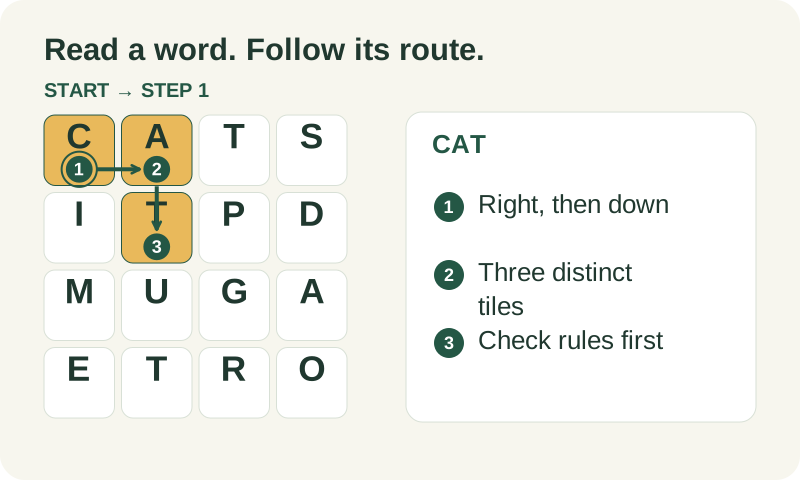
On a small example, C at row 1 column 1 connects right to A at row 1 column 2, then down to T at row 2 column 2. CAT is a turning path made of three distinct adjacent cells. Reading C, A, then an isolated T across the board is not equivalent. The independent validator checks position and spelling, not just whether CAT appears in the word list. This makes word hunt answers inspectable even when there is more than one valid route.
What to carry into your next attempt
Keep the word hunt solver result useful by preserving its context: board size, rule version, dictionary version, and completion status. If you are checking a different game, treat an accepted solver word as a hypothesis to verify there. The solver does not automate another game, claim its official dictionary, or turn an unfinished search into a complete answer.
Check the selected rules and custom points, word-list source and license, verification methods, and local data and network details when interpreting this example.